Working in Advanced Mode
Working in Advanced mode provides the opportunity to access and modify key values associated with a key frame, as well as the interpolation functions applied to the key values between selected key frames.
In the Advanced Animation Options dialog, shown below, key values are grouped according to their function — Scene's Views Properties are related to global properties such as lighting and camera focus, while the Dataset, Mesh, and Overlay properties are related to the settings of each object that is included in the animated sequence. Click the Advanced button to open the Advanced Animation Options dialog.
Advanced Animation Options dialog
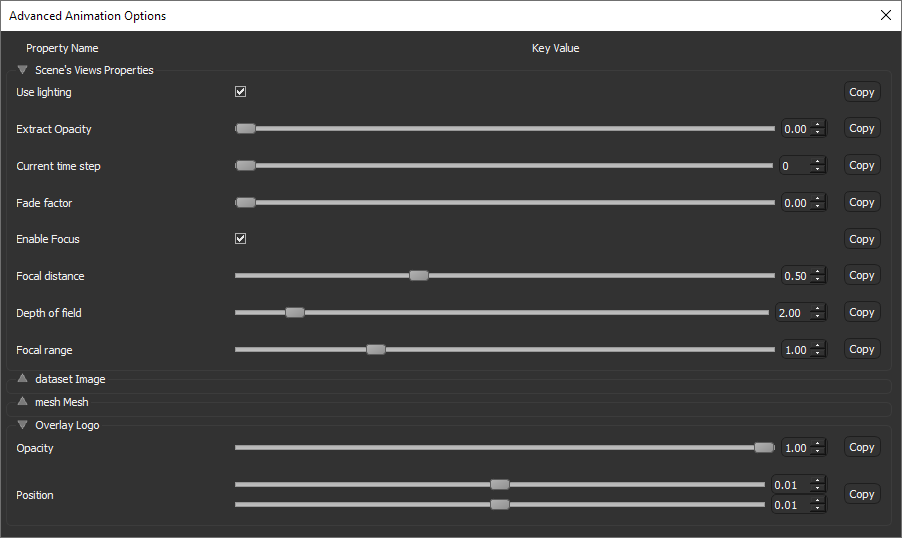
Property name… Indicates the name assigned to a key value. Click the checkbox next to the property name to enable or disable a property. You can disable a property or properties if you need to preview a simplified version of your animated sequence.
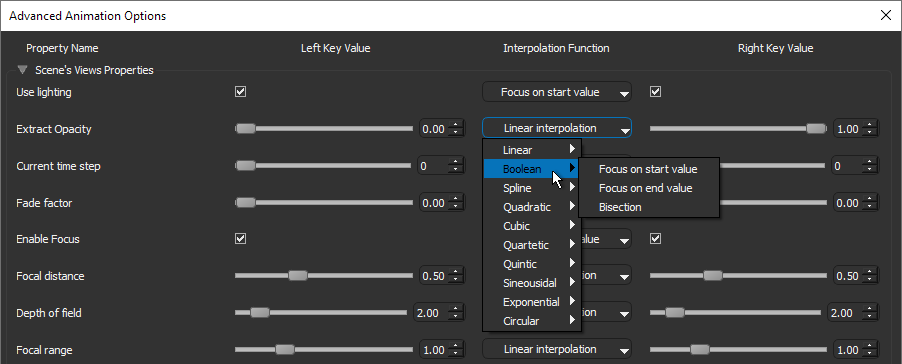
Key value(s)… Indicates the value assigned to a property. If the interval between two key frames is selected, then the values for the left and right key frames will be available.
Interpolation function… Available for the interval between selected key frames to smooth transitions between key values, as shown below.
Copy… Lets you copy the key value of a property to all key frames in the animated sequence.
 Property Types and Properties
The following tables list the different properties that are managed by the key frame structure of the Movie Maker. Set properties are saved in the different key frames and then restored, with interpolation if possible, when the timeline reaches the key frame.
Property Types
There are different types of properties, as listed below:
| Type | Description |
|---|---|
| BOOL | Is a Boolean value, which can be True or False. |
| Float | Is a floating point value. The valid range for a floating point value is specific for each property. |
| Integer | Is an integer value. |
| Vector | Is a 3 element vector (i.e. X, Y, Z coordinates). |
| Matrix | Is a 4 by 4 matrix. |
| LUT | Is a look-up table (LUT). |
| Aggregate | Is a complex object or structure that holds information relative to a specific object's state. |
Scene's Views Properties
The properties available for 3D scene views is listed in the following table.
| Property | Type | Description |
|---|---|---|
| Use Lighting | BOOL | If checked, lighting effects will be applied to the objects in the 3D view. |
| Extract Opacity | Float | The opacity of all image data in the 3D view that does not correspond to the labeled voxels of visible regions of interest and visible multi-ROI classes. |
| Current Time Step | Integer | The current time step (for time-enabled data only). |
| Fade Factor | Float | The brightness of the 3D view. At a setting of 1, the view will be completely black. |
| Enable Focus | BOOL | If checked, enables the focus effect. |
| Focal Distance | Float | The focal distance used for the blur effect.
Note You can adjust focus to highlight a particular feature or area of interest. |
| Depth of Field | Float | Determines the range of distance in front of and behind a focused object within which other objects will also appear clear and sharply defined in the resulting image. |
Dataset Properties
The properties available for datasets is listed in the following table.
| Property | Type | Description |
|---|---|---|
| W/L | Vector | The width and center window leveling values. These values can be modified through the Window Leveling panel. |
| Global Opacity | Float | The opacity factor, which can be found on the Window Leveling panel. |
| Edge Contrast | BOOL | If checked, displayed intensity values will be modulated with the values of their gradient modulus to produce an image in which edges are emphasized and other features are semi-transparent. |
| Edge Contrast Factor | Float | The factor that modules the gradient modulus. |
| W/L Gamma | Float | Factor which modifies the gamma curve, which is shown on the Window Leveling histogram, determines how tones are displayed in a view by defining the relationship between input values and the resulting image luminance. |
| W/L Opacity Gain | Float | Factor which modifies the gain curve, when the Window Leveling mode is set to Gain and Bias. |
| Lighting Diffuse Factor | Float | The diffuse component of the Blinn-Phong reflection model. |
| Lighting Specular Factor | Float | The specular component of the Blinn-Phong reflection model. |
| W/L Mode | integer | The current window leveling mode, which can be any of the following: Left-gated ramp, Bi-gated ramp, Bandpass ramp, Bandpass Gaussian, Bandpass constant, Gain and Bias, Piecewise. |
| Solidity Factor | Float | The solidity, or opaqueness, of the voxels of the selected object. |
| Shininess | Float | How much smooth surfaces of an object reflect light. Increasing shininess will result in surfaces that reflect more light. |
Mesh Properties
The properties available for meshes is listed in the following table.
| Property | Type | Description |
|---|---|---|
| Opacity | Vector | Opacity of the vertices. |
| Opacity In | Float | Opacity of the vertices when their associated scalar values are inside the In window rendering range (see Evaluating Scalar Meshes with the Measurement Inspector). |
| Opacity Out | Float | Opacity of the vertices when their associated scalar values are outside the Out window rendering range (see Evaluating Scalar Meshes with the Measurement Inspector). |
| Point Size | Integer | Determines the point size when meshes are rendered in Point mode. |
| Polygon Mode | Integer | Determines the rendering method applied to the mesh.
Point… Renders the mesh in points only. In this mode, point size can be adjusted. Line… Renders the mesh in wireframe. Fill… Renders the mesh as a solid. Outlined… Renders the mesh simultaneously as a solid and in wireframe. |
Plane Properties
The properties available for planes is listed in the following table.
| Property | Type | Description |
|---|---|---|
| Show Plane | BOOL | If checked, the visual plane will be visible. |
| Show Data | BOOL | If checked, the visual plane will render the corresponding 2D view. |
Overlay Properties
The properties available for text and image overlays are listed in the following table.
| Property | Type | Description |
|---|---|---|
| Opacity | Float | Determines the opacity of the overlay. |
| Position | Vector | Determines the position of the overlay along the X and Y axes of the 3D view.
At a setting of 0,0, the overlay will be aligned to the topmost left side of the view. At a setting of 1,1, the overlay will be aligned to the bottom right side of the view. |
Editing Key Values
You can edit the key values of a selected key frame or the key values of the left and right key frames of a selected interval. For selected intervals, you can also select an interpolation function.
- Do one of the following:
- Select the required key frame on the timeline.
- Select the interval between two key frames on the timeline. This will allow you to edit the key values of the left and right key frames, as well as to modify the default interpolation function applied to property transitions.
- Edit the key value(s) of the selected key frame(s), as required.
- If you are working on the interval between two key frames, change the default interpolation function for the transition between the key values, optional.
- Preview the animated sequence with the playback controls or by dragging the Seek bar (see Playback Controls).
